7.1 Seed
Important
Note the set sown amount, pulses/kg and the actual sown amount for future use
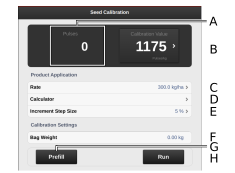
Figure 1. Calibration of delivered seed
Calculates pulses/kg
(You can also specify pulses/kg manually by pressing the field and entering the value in the popup window.)
Calculates the number of pulses
Specify the required seed application rate.
Counter
Set the required percentage increase/decrease of feed output in the variable rate field. For example, if you select 5%, the application rate will be changed in steps of 5% for each press of the button in the work display on the home screen.
Specify the weight of the contents of the calibration bag.
Feed for filling the feed system. Reset the pulse counter as well.
Calibrate