7.4 Radar
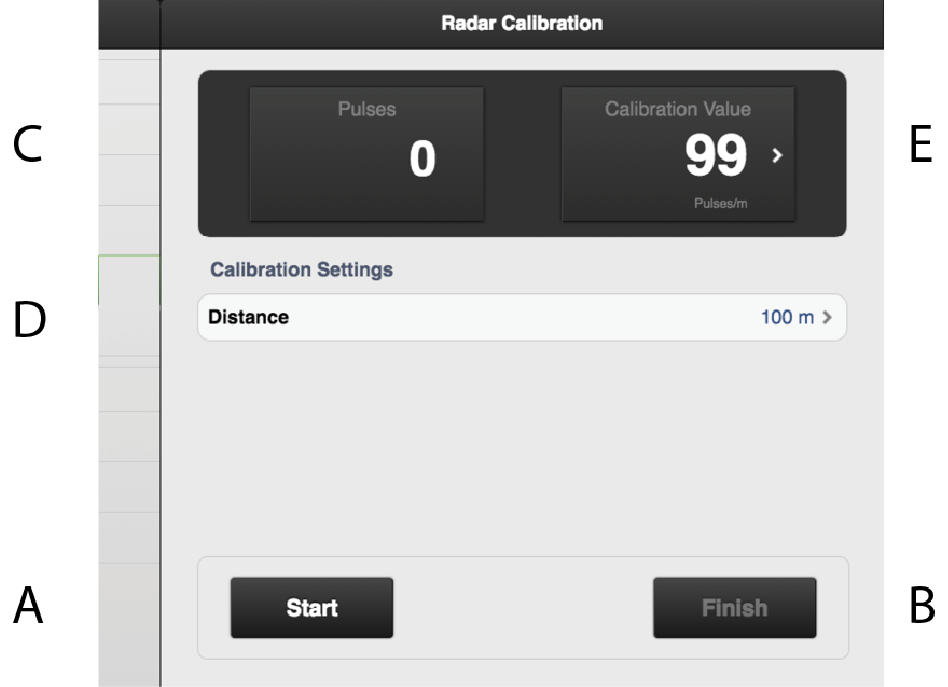
Figure 1.
Fields on the screen:
Resets and starts the measurement.
Finishes the calibration sequence.
Shows the total number of radar pulses during calibration.
Field to enter the distance driven when calibrating.
Shows calibration result as the number of radar pulses/m. (The factory default setting is 99 pulses).
Calibrating the radar:
Measure an optional distance (at least 100 m).
Press ‘A’ at the starting point to begin the measurement.
Press ‘B’ once the measured distance has been driven.
Press the ‘D’ field and enter the distance driven in metres. Number of pulses per metre driven is calculated and adjusted automatically in field ‘E’.
Press button ‘B’ to finish the measurement.
Alternatively, you can drive the measured distance with the machine lowered to the drilling position and stop the machine at the end point of the distance. Specify the driven distance in field ‘D’ and press button ‘B’ to discontinue measurement.