13.10.1 E-Control
The application rate is adjusted through a pop-up window directly on the home screen where it is possible to select a percentage change (the example in the screenshot shows the setting for the amount of seed delivered).
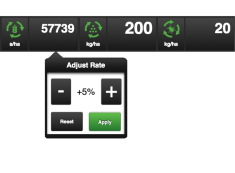
Figure 1.
Open the pop-up window by pressing on the field for the seed application rate. Adjust the control to the desired change. 0% means no change. The percentage change is recorded in the calibration menu.