13.9 Tramline programs
It is possible to manually select the bouts in the tramline program. It may be necessary to do so, such as in cases where there are irregular fields, for example.
The tramline icon is marked with ISOBUS when ISOBUS tramline is active.
For more information on tramlining, see 6.3 Tramlining.
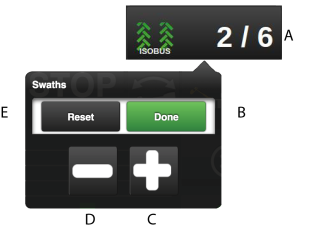
Figure 1.
Press the display field for bouts (A) at the top right of the home screen. A pop-up window will appear.
Use the plus or minus keys (C) and (D) to scroll through the tramlining program.
Return to the first pass of the tramlining program using the (E) key.
Conform your selection with (B).