6.5 Row unit settings
A warning will be shown before you enter the settings menu: Do not change any settings in this menu if you are unsure. An incorrect value could cause a row unit to stop working.
In the settings menu you can change the status of existing row units on the machine. A row unit can be activated, deactivated or disconnected. The row units that are crucial to the machine’s operation are marked as mandatory and cannot be deactivated or disconnected.
A red symbol in front of the row unit indicates that a row unit has been physically disconnected.
It is also possible to save or open an already saved row unit setting.
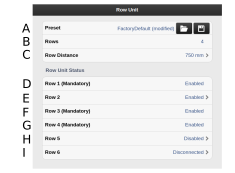
Figure 1. Row Unit Tempo
Preset (factory settings). Open row unit settings, save row unit settings
Number of activated rows
Row spacing
Row 1 (mandatory)
Row 2*
Row 3 (mandatory). *
Row 4 (mandatory).*
Row 5.*
Row 6.*
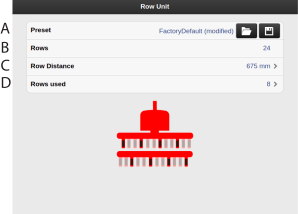
Figure 2. Row unit Proceed
Preset (factory settings). Open row unit settings, save row unit settings
Number of activated rows
Row spacing
Rows used. Defines actives rows (24 rows, 12 front rows, 8 rows)