8 Operational settings
Operational settings are available in the following instances:
Always for TPF.
On machines with hydraulic row unit pressure.
When FrontHopper 2200 is used.
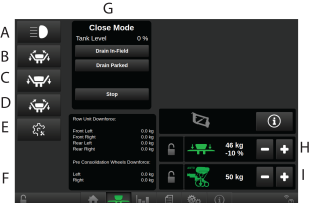
Figure 1.
Machine and/or FrontHopper work lights. Switches the work lights ON/OFF. For Proceed V, the machine and FrontHopper work lights are controlled individually.
Hydraulic wing folding1
Leave transport position2
Return to transport position 3
Service mode 4
Detailed information about downforce for row unit and pre consolidation wheels5
Liquid fertiliser (Close mode)
Additional wing pressure: Wing pressure is connected to the row unit pressure but can be adjusted if needed. Use the +/- buttons to increase/decrease wing pressure in percentage in relation to the row unit pressure. The presented percentage represent the adjustment in relation to the row unit pressure.
Current row unit pressure. Row unit pressure is adjusted using the +/- buttons. 6
The symbols for row unit pressure and wing pressure are green when the function is active; otherwise, they are grey