12.3.1 Calibration of the amount of delivered seed
Go to calibration by selecting Settings/Calibration. Select seed.
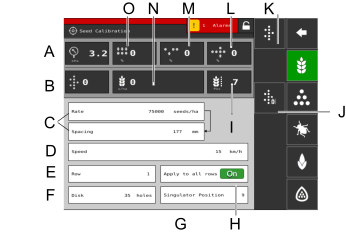
Figure 1.
Calibration menu settings (Values are displayed either in metric or imperial units, depending on which one has been selected in the general settings menu).
To choose the seed disc and settings for the metering unit, refer to the chapter “Drilling Recommendations” in the machine manual.
Air pressure
Amount of seed
Select calibration method. Enter the rate (number of seeds) and spacing between seeds in. (The selected calibration method is shown in the operations menu.)
Speed. Set the speed for which the machine is to be calibrated. If the expected driving speed is, for example, 12 km/h, the calibration must be done for a speed of 12 km/h.
Row. Select which of the row units is to be calibrated (i.e. the row that has a calibration bag).
Disk. Enter the number of holes on the seed disc installed in the seed feed housing.
Singulator position
Apply to all rows ON/OFF. If the calibration is to cover all row units, select ON (default setting). If calibration is to be carried out individually for only one row unit, select OFF.
Actual position for singulator
Singulator motors calibration.
Calibrate
Doubles
Skips
Mean seed rate (number of seeds/ ha)
Seed quality
Calibration
Check that there is seed in the seed hopper; the depth of seed should be at least 15 cm.
The calibration is normally carried out on one seed feed housing unit and the values are automatically carried over to the others. Check that there is seed in the seed hopper; the depth of seed should be at least 15 cm.
Position a calibration bag under the feed for the seed meter to be calibrated.
Position a calibration bag under the feed for the seed meter to be calibrated.
Enter the values in the calibration menu
Start the calibration with the
 button and hold it in until the indication
for amount of seed delivered is showing at least 200.
button and hold it in until the indication
for amount of seed delivered is showing at least 200.Read off the proportion of skips
 and doubles
  . If any value is too high, adjust the
singulator.
. If any value is too high, adjust the
singulator. To reduce the proportion of doubles, reduce the singulator dial’s set value.
To reduce the proportion of skips, increase the singulator dial’s set value.
Repeat points 4 to 5 until the required accuracy has been achieved.
You can exit the calibration menu using
 , or go directly to calibration of another
unit
, or go directly to calibration of another
unitRemove the calibration bag and pour the seed back into the hopper.