14.2.1.1 Switching between transport position and working position
The machine must not rest on safety catches during transportation.
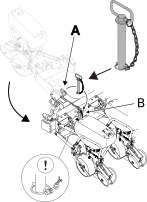
Figure 1.
Lift up the machine so that it moves free of the ground and start the terminal.

Figure 2.
 Release the locking pin from position
(A).
Release the locking pin from position
(A).If the machine is equipped with hydraulic wing folding, undo the pin (A) on both sides.
If the machine is equipped with hydraulic wing folding, press the wing folding button for three seconds so that the symbol for transportation mode is shown. Fold out the wing sections with the tractor’s hydraulic lever. Once the wing sections are fully folded out, the home screen button is displayed.
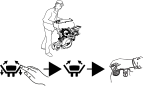
Figure 3.
 Press the home screen button.
- Lock both the wing sections in the folded
out position with the locking pins in position (B).
Raise the machine to its topmost position. Keep the hydraulic lever in this position with the tractor idling until all movement has stopped in order to synchronise the lifting cylinders of the wheels. The cylinders allow seepage when in their top and bottom positions so that the oil can overflow through the system and expel any air. Always repeat this when hitching the tractor, before adjusting the machine and several times during the working day.
– If the machine is equipped with support wheels (applies to TPF8) first lower the machine to the working position in order to open the hydraulic valve for the support wheels.

Figure 4.