E-Services < Back to Instructions Search Portal

E-Services

8.2.1 Fill mode

    904189 - 08 - en-GB

    8.2.1 Fill mode

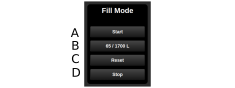
    Figure 1.

    Hose must be connected to the machine’s filling outlet.

    1. Start filling the hopper.

    2. Specify how much the tank should be filled. The current fertiliser fill level is displayed.

    3. Reset current fertiliser fill level.

    4. Stop filling the tank.

    Parent topic: 8.2 Liquid fertiliser operations (only TPL with liquid fertiliser)
    Next topic: 8.2.2 Working mode

    © Copyright Väderstad Group

    Find topics by title

    Topic finder activated by typing “t”. Continue typing to filter the list of topics.

    Use ↑ and ↓ to navigate the results; then press ENTER to view a topic, or ESC to close this dialog.

    Keyboard shortcuts

    You’ve activated the keyboard shortcuts help by typing “?”.

    t Open the topic finder to filter the list of topic titles
    s Use the search field to find text in topic content
    ? Show this list of keyboard shortcuts
    ESC Close this dialog