6.3.1 Calculation of tramlining
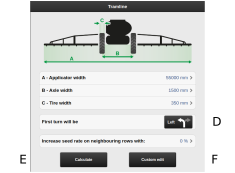
Figure 1.
This screen is intended for calculation of tramlining. A suggested calculation can be chosen based on the settings entered. It is also possible to design a tramline program yourself.
The background is light when the screen is in display mode, and the screen is dark when changes/designs are being made. This is to clarify where you are.
The following values need to be entered:
Total width of the spraying implement.
Distance between the pair of wheels.
Width of the wheels (safe clearance of the plants can be achieved by entering a higher value here. Example: the wheel width is 500 mm, but additional protection of 50 mm for the plant is desired – so 600 mm should be entered).
Also indicate which direction the tractor will turn after the first bout.
Buttons for selecting calculations
The calculation is based on the information entered.
Facilitates your own, customised tramlining.
To simplify the process of setting up a tramline program, it is advisable to select a suggested tramline as a basis for your own one. But please note that such a tramline program will only come up with a suggestion, and it is important that you check its suitability.
The suggested tramline has no upper limit for the number of bouts. The maximum number of bouts that can be generated is 120. If the suggestion is not suitable, it can be adjusted by modifying the wheel width and generating a new tramline. Alternatively, adapt the tramline described below to create your own.