2.7.1 Button functions
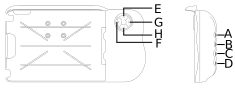
Figure 1.
-
A+E/A+H — Variable hopper A rate: hold down button A and move UP/DOWN using buttons E and H.
A+F — Shutting off section by section from right to left: hold down button A and press F.
If all sections are switched off, it will switch on section by section from right to left.
A+G — Shutting off section by section from left to right: hold down button A and press G.
If all sections are switched off, it will switch on section by section from left to right.
-
B+E/B+H — Variable hopper B rate: hold down button B and move UP/DOWN using buttons E and H.
B+F — Shutting off section by section from right to left: hold down button B and press F.
If all sections are switched off, it will switch on section by section from right to left.
Note also that it controls the sections of both hopper A and B.
B+G — Shutting off section by section from left to right: hold down button A and press G.
If all sections are switched off, it will switch on section by section from left to right.
Note also that it controls the sections of both hopper A and B.
Alarms menu (displayed as long as the button is held down).
Statistics menu (displayed as long as the button is held down).
N/A
Used to switch between high lift and full lift.
N/A
Manual feed.