5.4 Sections
The manually section control is always done on both hoppers at the same time. There is no possibility to manually shut down a section for only one hopper.
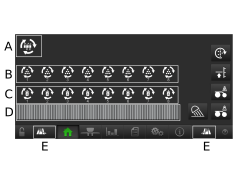
Figure 1.
Motor indicator of the auger. When the auger is active this will be green and rotate.
Shows Hopper B. These correspond to the section motors from left to right. They are green and rotating when active. Press a motor to disable/enable that section. A disabled section is grey.
Shows Hopper A. These correspond to the section motors from left to right. They are green and rotating when active. Press a motor to disable/enable that section. A disabled section is grey.
Only visible if SeedEye is enabled. Contains the row status indicators.
Green row = Active
Grey row = Not active
Red row = Problem
Used to disable or enable sections from left to right respectively from right to left.