12.1.1.2 Override critical alarm
CAUTION
Override only works for critical alarms (red). When an alarm is overridden the machine is not fully functional or can be damaged.
Note
The override button is only available for certain critical alarms.
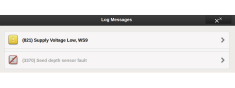
Enter the alarms menu by tapping the alarm symbol.
Select an alarm by using the UP/DOWN arrows on the VT or press an alarm field on the iPad. Information about the alarm is shown in the new window .
Press the override button and confirm. Seed drilling can now proceed despite the critical alarm. The icon of the overridden critical alarm changes from red to grey with a red line through it.