7.4.2 Seed calculation menu
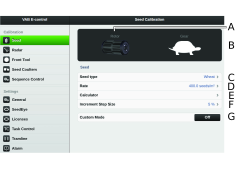
Figure 1.
Rotor. Displays the recommended rotor.
Gear. Displays the recommended gear.
Seed type. Enter the selected seed type.
Sown amount. Enter the selected sown amount..
Calculator.
Set the required percentage increase/decrease of feed output in the variable rate field. For example, if you select 5%, the application rate will be changed in steps of 5% for each press of the button in the work display on the home screen.
Custom mode (ON/OFF.)