E-Services < Back to Instructions Search Portal

E-Services

5.2 Function buttons

    601010-000090 - 06 - en-GB

    5.2 Function buttons

    Field B on the home screen. See figure Figure 1.
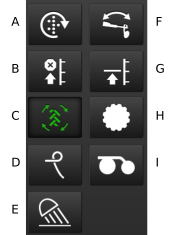
    Figure 1. Function buttons

    1. Manual output.

    2. Lift stop.

    3. Auto advance tramline.

    4. Hydraulic following harrow.

    5. Work lights.

    6. Bout marker switching.

    7. Low-Lift – Full-Lift.

    8. Front tools.

    9. Seed coulter (pressure and depth (option)).

    Parent topic: 5 The home screen
    Previous topic: 5.1 Display for control and monitoring
    Next topic: 5.3 Navigation buttons

    © Copyright Väderstad Group

    Find topics by title

    Topic finder activated by typing “t”. Continue typing to filter the list of topics.

    Use ↑ and ↓ to navigate the results; then press ENTER to view a topic, or ESC to close this dialog.

    Keyboard shortcuts

    You’ve activated the keyboard shortcuts help by typing “?”.

    t Open the topic finder to filter the list of topic titles
    s Use the search field to find text in topic content
    ? Show this list of keyboard shortcuts
    ESC Close this dialog